![DQS_White_RGB-1.png]](https://learn.dqsglobal.com/hs-fs/hubfs/DQS_White_RGB-1.png?height=40&name=DQS_White_RGB-1.png)
Introduction:
This manual introduces the new sanctions screening process in HubSpot and explains what it means for Sales in daily operations.
The screening process is integrated into the existing sales workflow. It starts automatically when a Deal enters the Application Review stage and uses data from the associated Primary Company.
This guide shows:
- What Sales must check before starting the screening
- What HubSpot and LSEG do automatically
- Which statuses and results Sales will see
- Which notifications Sales will receive
- How to proceed for each possible screening outcome
The key message for Sales is simple: The new process does not add a separate screening task. It replaces the previous manual control with a structured and automated process in HubSpot.
Chapter 1: What changes?
Why are we introducing this process?
DQS must ensure that new customers and partners are screened consistently against applicable sanctions requirements.
Previously, sanctions relevance was covered through a manual control in the Global Sales Process. Sales had to confirm whether a Company was subject to international sanctions by completing a field in HubSpot. This approach had several limitations:
- The screening depended on manual research and confirmation by Sales
- No dedicated sanctions screening system was used
- The result was not based on a standardised review process
- Potential matches were not systematically routed to Compliance
The new integration connects HubSpot with LSEG World-Check One, DQS’s designated sanctions screening system.
This creates a consistent process in which:
- HubSpot initiates the screening automatically
- LSEG performs the sanctions screening
- Compliance reviews possible matches
- The result is written back to HubSpot
- Sales receives a clear instruction to continue, wait or stop
The objective is not to make Sales responsible for sanctions decisions. Sales remains responsible for maintaining the correct Deal and Company data. LSEG and Compliance provide the screening result and final decision.
What changes for Sales?
Previous process:
Previously, Sales:
- Performed or supported a manual sanctions check
- Confirmed the result through a HubSpot field "is_the_companyperson_subject_to_any_international_sanctions"
- Had limited visibility into a formal review process
- Did not receive a standardised system result from a dedicated screening platform
New process:
Going forward:
- There is no separate manual screening task for Sales
- Screening starts automatically when the Deal is moved to Application Review
- Possible matches are reviewed by Compliance
- Sales receives notifications for relevant final decisions
- A pipeline rule prevents the Deal from progressing before the screening is complete
Sales must therefore focus on three responsibilities:
- Ensure that the correct Company is associated with the Deal and marked as Primary.
- Ensure that the Company record contains a valid legal Company Name and that the correct country is set-
- Follow the screening status and act according to the final result.
Sales must not conduct its own sanctions assessment, overwrite screening properties or bypass a blocked result.
Scope of the new process
Affected pipelines:
The sanctions screening process applies to Deals in the following pipelines:
- Hunting Pipeline – New Sales
- Hunting LP
The screening is triggered when an applicable Deal is moved to the Application Review stage.
Sales should not assume that screening applies only to one type of new customer. The process must be followed for all Deals covered by these pipelines.
New field properties
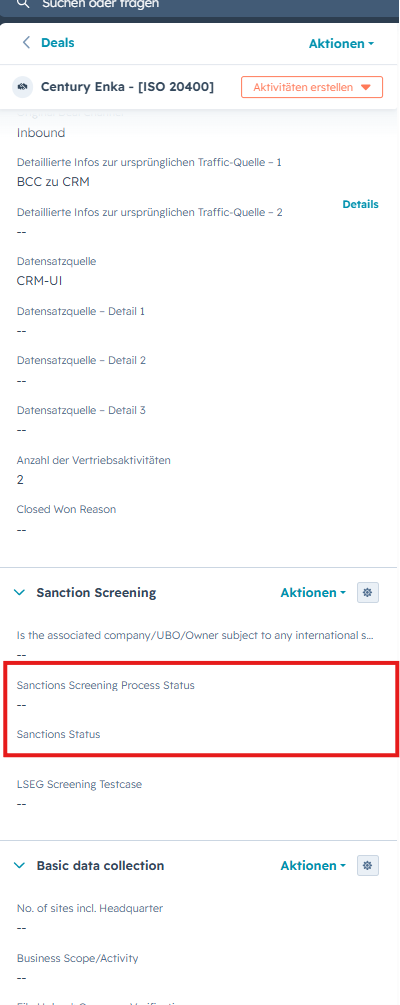
The screening result is documented through properties on both the Deal and the Company record.
The principal properties include:
| Property | Purpose |
|---|---|
| Sanctions screening process status | This property indicates where the case currently is in the sanctions screening process. |
| Sanctions status | Shows the final screening decision |
| Sanctions block reason | Documents why a Company was blocked |
| Sanctions type | Records the relevant sanctions or enforcement category |
HubSpot updates the fields automatically as the screening progresses.
Sales should use the fields to understand the status of the case but must not change them manually.
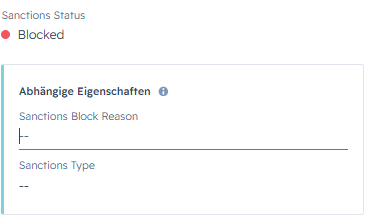
When Selection Status is set to blocked, 2 additional field properties will appear:
- Sanctions Block Reason
- Sanction Type
New pipeline rule
A new pipeline rule technically prevents an applicable Deal from leaving the Application Review stage until:
Sanctions screening process status = Completed
This ensures that the Deal cannot progress while the screening is:
- screening requested
- In Review
- In Error
After the process is completed, the final Sanctions status determines the next action:
| Final result | Consequence |
|---|---|
| Approved | Sales may continue to work on deal |
| Approved subject to conditions | Sales may continue subject to the Compliance conditions |
| Blocked | The Deal may not continue and is moved to Closed Lost |
Chapter 2: Process overview
The screening process starts automatically when a Deal is moved to the Application Review stage.
After that, the Deal follows one of four paths:
- Path A: No match found (automatically approved)
- Path B: Possible match approved by a Compliance Officer
- Path C: Possible match blocked by Compliance
- Path D: Technical error
Step 1: Verify the Deal and Company information
Before moving the Deal to the Application Review stage, confirm that the Deal and Company information is complete and accurate.
Check the following:
- A Company record is associated with the Deal.
- The correct Company is marked as Primary.
- The Company record contains the valid legal Company Name.
- The Country is populated where available.
A Deal may have multiple associated Companies. However, only the Company marked as Primary is used for the sanctions screening.
Do not move the Deal to Application Review if:
- No Company is associated
- The wrong Company is marked as Primary
- The Company Name and Country is missing or incorrect
Step 2: Move the Deal to Application Review
Once the Deal and Company information has been verified:
- Open the Deal.
- Change the Deal stage to Application Review.
This automatically starts the sanctions screening. Sales does not need to submit a separate screening request.
Step 3: Confirm that the screening has started
HubSpot sends the data from the Primary Company to LSEG World-Check One.
The following property is updated:
Sanctions Screening Process Status = Screening Requested
This property shows the current stage of the case within the sanctions screening process.
Sales action:
- Keep the Deal in Application Review.
- Wait for the screening result.
- Do not manually change the sanctions screening properties.
Step 4: Monitor the screening status
While the case is being processed, the status will stay in "Screening Requested"-
This means that the screening is still ongoing.
Sales action:
- Wait.
- Do not move the Deal to the next stage.
- Do not interpret "Screening Requested" as an approval.
Step 5: Identify the applicable path
Once a result is available, review these two properties:
- Sanctions Screening Process Status
- Sanctions Status
Use the following overview:
|
Sanction Screening Process status |
Sanctions status | Follow this path |
|---|---|---|
| Completed | Approved | Path A or Path B |
| Completed | Blocked | Path C |
| Error | Empty or pending | Path D |
Path A: No match found
This path applies when LSEG does not identify a potential Company match.
Step A1: LSEG completes the screening
LSEG screens the Primary Company using the submitted Company data.
No potential match is found.
No manual Compliance review is required.
Step A2: HubSpot updates the records
HubSpot automatically updates the screening properties on the Deal and associated Primary Company.
The main Deal properties are updated as follows:
| Property | Value |
|---|---|
| Sanctions Screening Process Status | Completed |
| Sanctions Status | Approved |
| Sanctions Gate Passed | Yes |
Step A3: Sales checks the result
No separate notification is sent to the Deal Owner for the automatic no-match approval path.
Sales must therefore monitor the Deal status.
Sales action:
- Open the Deal.
- Confirm that Sanctions Screening Process Status = Completed.
- Confirm that Sanctions Status = Approved.
- Move the Deal to the next applicable stage.
Path B: Possible match approved by Compliance
This path applies when LSEG identifies a potential match and Compliance subsequently approves the Company.
Step B1: A possible match is identified
LSEG identifies a potential Company match.
The case requires a manual review by Compliance. It will be routed to the dedicated Compliance Officer responsible for the relevant region: Greater China, APAC, EMEA, or the Americas. The assigned officer will receive a notification that a new case has been submitted for internal review.
The process status updates to:
Sanctions Screening Process Status = In Review
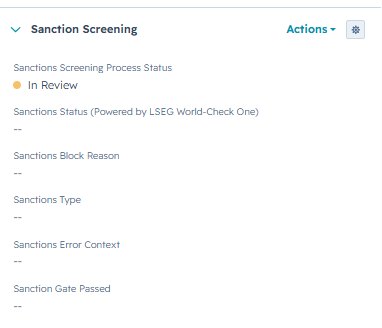
The final Sanctions Status is not yet available.
Sales action:
- Keep the Deal in Application Review.
- Wait for the Compliance decision.
- Do not continue the sales process.
- Do not manually change the screening properties.
Step B2: Compliance reviews the match
Compliance reviews the LSEG result and compares it with the available Company data.
The review may consider information such as:
- Legal Company Name
- Country
- Address
- Company identifiers
- Information returned by LSEG
Step B3: Compliance approves the Company
Compliance determines that the potential match does not prevent the Company from proceeding.
HubSpot receives the final decision.
Step B4: HubSpot updates the records
The Deal and Primary Company properties are updated.
| Property | Value |
|---|---|
| Sanctions Screening Process Status | Completed |
| Sanctions Status | Approved or Approved subject to Conditions |
| Sanctions Gate Passed | Passed or equivalent configured value |
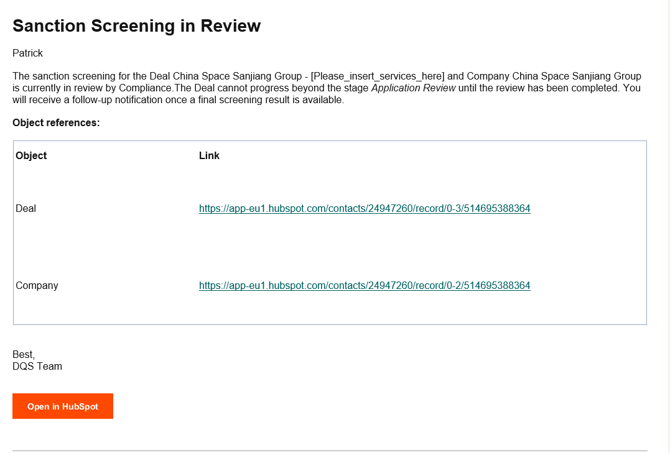
Step B5: Sales receives a notification
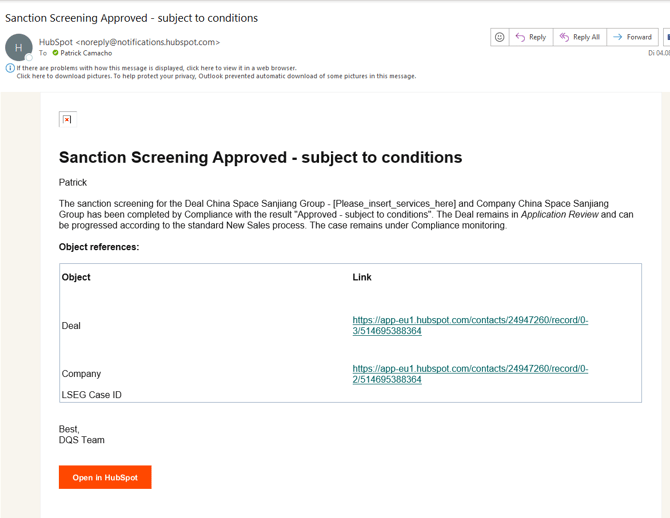
An internal HubSpot notification is sent to the Deal Owner.
The notification informs Sales that:
- The Compliance review has been completed.
- The Company has been approved.
- The Deal may continue.
Approved - Notification:
Approved subject to Condition - Notification:
Step B6: Sales continues the Deal
Sales action:
- Open the HubSpot notification.
- Open the Deal.
- Confirm that Sanctions Screening Process Status = Completed.
- Confirm that Sanctions Status = Approved or Approved Subject to Conditions
- Continue with the next applicable Deal stage.
Path C: Possible match blocked by Compliance
This path applies when LSEG identifies a possible match and Compliance confirms that the Company may not proceed.
Step C1: A possible match is identified
The case requires a manual review by Compliance. It will be routed to the dedicated Compliance Officer responsible for the relevant region: Greater China, APAC, EMEA, or the Americas. The assigned officer will receive a notification that a new case has been submitted for internal review.
The process status updates to:
Sanctions Screening Process Status = In Review
Sales action:
- Wait for the final Compliance decision.
- Keep the Deal in Application Review.
- Do not continue the sales process.
- Do not manually change the screening properties.
Step C2: Compliance blocks the Company
Compliance confirms that the Company cannot be approved.
The final decision is returned to HubSpot.
Step C3: HubSpot updates the records
The Deal and associated Primary Company properties are updated.
| Property | Value |
|---|---|
| Sanctions Screening Process Status | Completed |
| Sanctions Status | Blocked |
| Sanctions Gate Passed | False |
| Sanctions Block Reason | Populated |
| Sanctions Type | Populated |
The block reason documents why the Company may not proceed.
Sales must not change this information manually.
Step C4: HubSpot updates the Deal stage
HubSpot automatically moves the Deal to:
-
Closed Lost & Disqualified
The relevant Closed Lost reason is recorded according to the configured workflow.
Sales must not move the Deal back into an active stage.
Step C5: Sales receives a notification
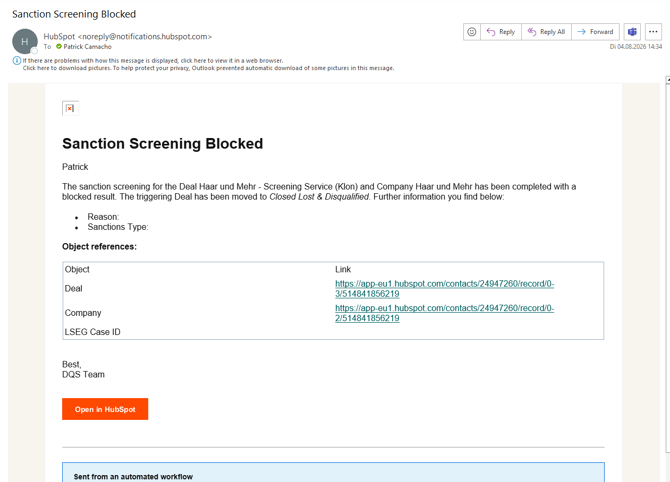
An internal HubSpot notification is sent to the Deal Owner.
The notification informs Sales that:
- The Company has been blocked.
- The Deal cannot continue.
- The Deal has been moved to Closed Lost.
- The block reason is available on the Deal.
Blocked-Notification
Step C6: Sales stops the sales process
Sales action:
- Open the notification.
- Open the Deal.
- Confirm that Sanctions Status = Blocked.
- Review the Sanctions Block Reason.
- Confirm that the Deal has been moved to Closed Lost.
- Stop all sales and onboarding activities.
- Do not create a new Deal to bypass the result.
- Contact Compliance only if clarification is required.
Path D: Technical error
This path applies when the screening cannot be completed because of a technical or data-related issue.
An error does not mean that the Company is approved or blocked.
Step D1: HubSpot detects an error
The screening request or response cannot be processed successfully.
Possible causes may include:
- Missing or invalid Company data
- Failure when submitting the request to LSEG
- Technical integration failure
- Failure when processing the LSEG response
- Failure when updating the HubSpot records
Step D2: HubSpot updates the status
The Deal property is updated to:
-
Sanctions Screening Process Status = Error
The final Sanctions Status remains empty or pending because no valid decision has been received.
The following field property is used to document the type of error:
- sanctions_error_context
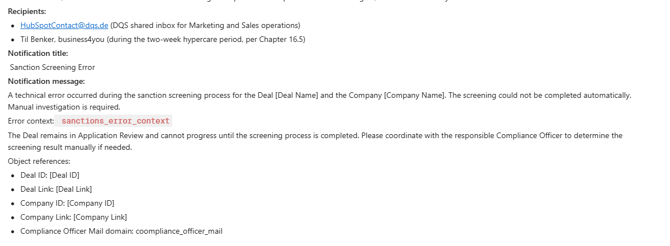
Step D3: An error notification is sent
An internal notification is sent to HubSpotContact@dqs.de.
The notification indicates that the sanctions screening could not be completed and shows the reason behind the error.
Sales action:
-
None, Sales does not need to initiate the process. The responsible HubSpot support team reviews the error and takes the required action.
Final decision overview
| Current status | Sales action |
|---|---|
| Screening Requested | Wait |
| In Review | Wait for LSEG or Compliance |
| Completed and Approved | Continue to work on deal |
| Completed and Blocked | Stop; Deal is set to Closed Lost |
| Error | None |
Watch this short tutorial for a step-by-step walkthrough of the automated sanctions screening process in HubSpot. The video explains when the screening is triggered, how Sales should proceed, the different screening statuses, notifications, and the possible outcomes during the Application Review stage.